Jour 4 · Dimanche 25 octobre 2026 · 13 h – 17 hDay 4 · Sunday 25 October 2026 · 13:00 – 17:00
Mettre en scène,Stage,présenter et transmettrepresent and pass on
Valoriser votre pièce dans une courte animation Blender de 5 à 10 secondes, puis préparer et donner votre première mini-leçon.Showcase your part in a short 5 to 10 second Blender animation, then prepare and give your first mini-lesson.
Kinshasa3 participantsBlender · caméra · pédagogieBlender · camera · teaching
Résumé visuelVisual summary
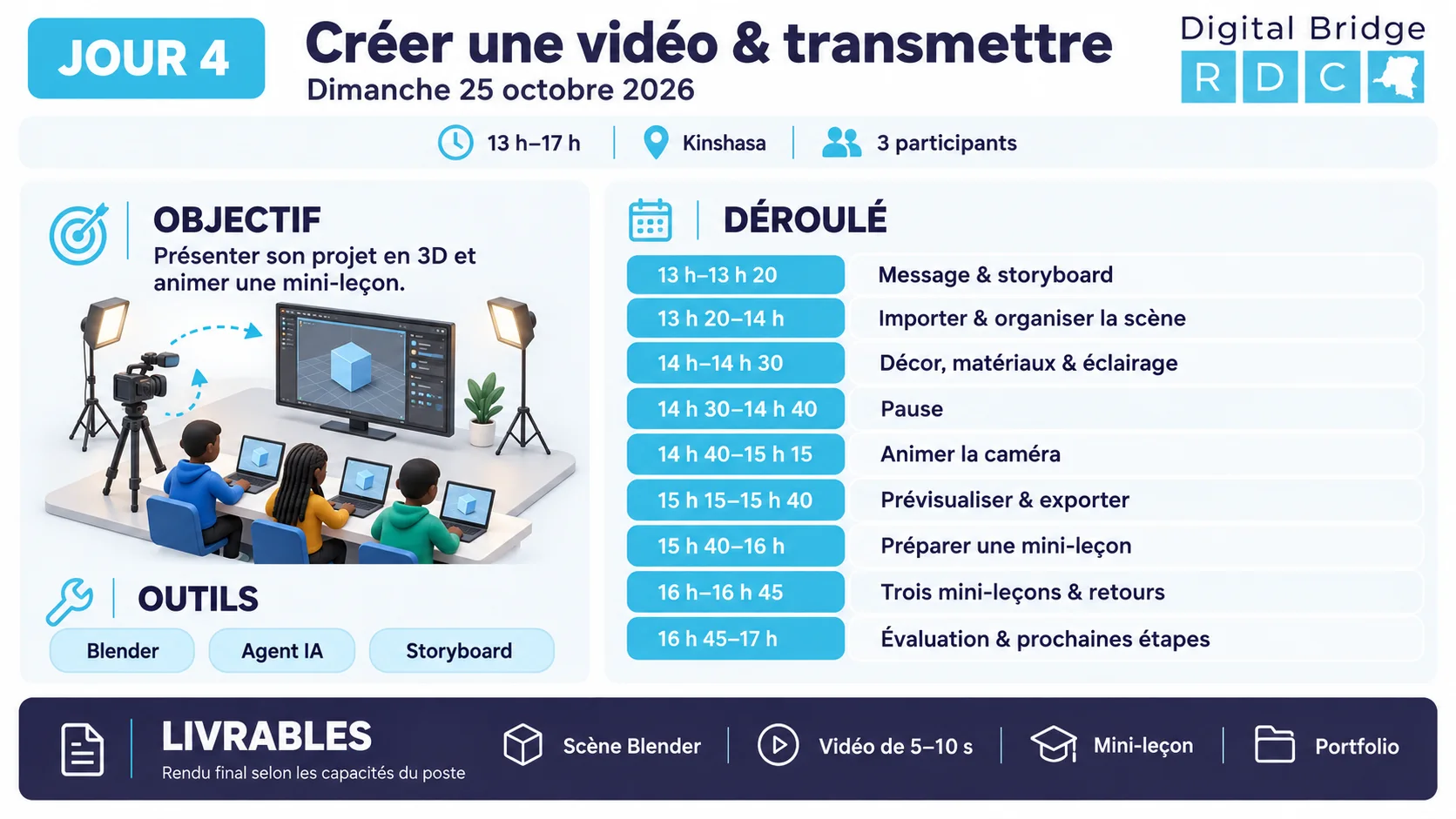
L’infographie de la journée en un coup d’œil.The day’s infographic at a glance.
Jour 4 · Dimanche 25 octobre 2026Day 4 · Sunday 25 October 2026Cliquer pour agrandirClick to enlarge
Déroulé de l’après-midiAfternoon schedule
13 h à 17 h, heure de Kinshasa.13:00 to 17:00, Kinshasa time.
13 h–13 h 2013:00–13:2020 min
Message et storyboardMessage and storyboard
Définition du message de la vidéo et préparation d’un mini-storyboard : vue générale, détail et usage de la pièce.Defining the message of the video and preparing a mini-storyboard: overall view, detail and use of the part.
Atelier Blender : navigation, import du modèle, échelle, positionnement, matériaux et organisation.Blender workshop: navigation, model import, scale, positioning, materials and organisation.
Résultat : Scène contenant le modèle du participant.Result: Scene containing the participant’s model.Voir le tutorielSee the tutorial
14 h–14 h 3014:00–14:3030 min
Environnement et éclairageEnvironment and lighting
Création d’un environnement simple : sol, fond et objets de contexte. Réglage de l’éclairage et choix du cadrage.Creating a simple environment: floor, background and context objects. Adjusting the lighting and choosing the framing.
Animation de caméra : images clés, déplacement, rythme et prévisualisation. Assistance d’un agent IA pour écrire ou adapter un script simple, puis contrôle du résultat.Camera animation: keyframes, movement, rhythm and preview. Help from an AI agent to write or adapt a simple script, then checking the result.
Choix des paramètres de rendu, export d’une prévisualisation et préparation du rendu final selon les capacités du poste.Choosing the render settings, exporting a preview and preparing the final render according to the workstation’s capabilities.
Préparation d’une mini-leçon : objectif, matériel, démonstration, exercice, erreur fréquente et vérification des acquis.Preparing a mini-lesson: objective, equipment, demonstration, exercise, common mistake and checking of what was learned.
Chaque participant enseigne une opération pendant 10 minutes, puis reçoit 5 minutes de retour du groupe.Each participant teaches one operation for 10 minutes, then receives 5 minutes of feedback from the group.
Évaluation finale, présentation des réalisations et définition des prochaines responsabilités.Final assessment, presentation of the achievements and definition of the next responsibilities.
Message et mini-storyboard en trois vuesMessage and mini-storyboard in three views
Décider ce que la vidéo doit faire comprendre avant d’ouvrir Blender.Decide what the video must get across before opening Blender.
0/5étapessteps
J4 · T2D4 · T240 min · 13 h 2040 min · 13:20
Blender : navigation, import, échelle et organisationBlender: navigation, import, scale and organisation
Obtenir une scène propre contenant le modèle du participant, à la bonne échelle et bien rangée.Get a clean scene containing the participant’s model, at the right scale and well organised.
Vues face, côté, dessus, caméraFront, side, top, camera views
Pavé num. 1, 3, 7, 0Num. keypad 1, 3, 7, 0
Déplacer, tourner, mettre à l’échelleMove, rotate, scale
G, R, S(puis X, Y ou Z pour verrouiller un axe)(then X, Y or Z to lock an axis)
Panneau Item (dimensions)Item panel (dimensions)
N
Appliquer l’échelleApply scale
Ctrl + A, Scale
AnnulerUndo
Ctrl + Z
J4 · T3D4 · T330 min · 14 h30 min · 14:00
Environnement, lumière et cadrageEnvironment, light and framing
Construire un décor simple et un éclairage qui rendent la pièce lisible.Build a simple set and lighting that make the part readable.
0/8étapessteps
Moteurs de renduRender enginesPour un poste modeste, choisissezFor a modest computer, chooseEevee(rapide).(fast).Cyclesest plus réaliste mais beaucoup plus lent : gardez-le pour une version finale si la machine le permet.is more realistic but much slower: keep it for a final version if the machine allows.
J4 · T4D4 · T435 min · 14 h 4035 min · 14:40
Animer la caméra avec des images clésAnimating the camera with keyframes
Produire un mouvement de caméra de 5 à 10 secondes, par la méthode manuelle puis avec un script écrit ou adapté par un agent IA et contrôlé.Produce a 5 to 10 second camera movement, by the manual method and then with a script written or adapted by an AI agent and checked.
0/9étapessteps
Script Blender de référence : orbite de caméra (Python)Reference Blender script: camera orbit (Python)
import bpy, math

# Orbite de caméra autour de la pièce, 8 secondes à 24 images/seconde.
FPS = 24
SECONDES = 8
RAYON = 120.0      # distance de la caméra à la pièce (unités de la scène)
HAUTEUR = 60.0
CIBLE = (0.0, 0.0, 10.0)   # point regardé

sc = bpy.context.scene
sc.render.fps = FPS
sc.frame_start = 1
sc.frame_end = FPS * SECONDES

# Objet vide qui sert de pivot et de cible
bpy.ops.object.empty_add(type='PLAIN_AXES', location=CIBLE)
pivot = bpy.context.active_object
pivot.name = "Pivot_camera"

cam = sc.camera
if cam is None:
    bpy.ops.object.camera_add()
    cam = bpy.context.active_object
    sc.camera = cam
cam.name = "Camera_principale"
cam.location = (RAYON, 0.0, HAUTEUR)
cam.parent = pivot

# La caméra regarde toujours le pivot
for c in list(cam.constraints):
    cam.constraints.remove(c)
tr = cam.constraints.new(type='TRACK_TO')
tr.target = pivot
tr.track_axis = 'TRACK_NEGATIVE_Z'
tr.up_axis = 'UP_Y'

# Images clés : le pivot fait un quart de tour (90 degrés)
pivot.rotation_euler = (0, 0, 0)
pivot.keyframe_insert(data_path="rotation_euler", frame=1)
pivot.rotation_euler = (0, 0, math.radians(90))
pivot.keyframe_insert(data_path="rotation_euler", frame=sc.frame_end)

# Mouvement régulier : interpolation linéaire
for fc in pivot.animation_data.action.fcurves:
    for kp in fc.keyframe_points:
        kp.interpolation = 'LINEAR'

print("Animation :", sc.frame_end, "images,", SECONDES, "secondes")import bpy, math

# Camera orbit around the part, 8 seconds at 24 frames per second.
FPS = 24
SECONDES = 8
RAYON = 120.0      # distance from the camera to the part (scene units)
HAUTEUR = 60.0
CIBLE = (0.0, 0.0, 10.0)   # point looked at

sc = bpy.context.scene
sc.render.fps = FPS
sc.frame_start = 1
sc.frame_end = FPS * SECONDES

# Empty object used as pivot and target
bpy.ops.object.empty_add(type='PLAIN_AXES', location=CIBLE)
pivot = bpy.context.active_object
pivot.name = "Pivot_camera"

cam = sc.camera
if cam is None:
    bpy.ops.object.camera_add()
    cam = bpy.context.active_object
    sc.camera = cam
cam.name = "Camera_principale"
cam.location = (RAYON, 0.0, HAUTEUR)
cam.parent = pivot

# The camera always looks at the pivot
for c in list(cam.constraints):
    cam.constraints.remove(c)
tr = cam.constraints.new(type='TRACK_TO')
tr.target = pivot
tr.track_axis = 'TRACK_NEGATIVE_Z'
tr.up_axis = 'UP_Y'

# Keyframes: the pivot makes a quarter turn (90 degrees)
pivot.rotation_euler = (0, 0, 0)
pivot.keyframe_insert(data_path="rotation_euler", frame=1)
pivot.rotation_euler = (0, 0, math.radians(90))
pivot.keyframe_insert(data_path="rotation_euler", frame=sc.frame_end)

# Steady movement: linear interpolation
for fc in pivot.animation_data.action.fcurves:
    for kp in fc.keyframe_points:
        kp.interpolation = 'LINEAR'

print("Animation:", sc.frame_end, "frames,", SECONDES, "seconds")
À adapterTo adaptLes valeursThe valuesRAYON, HAUTEURetandCIBLEdépendent de l’échelle de votre scène. Si la pièce est hors champ, divisez ou multipliez-les. C’est une occasion de corriger le résultat de l’IA par la mesure.depend on the scale of your scene. If the part is out of view, divide or multiply them. This is a chance to correct the AI’s result by measuring.
J4 · T5D4 · T525 min · 15 h 1525 min · 15:15
Rendre la vidéo : prévisualisation puis rendu finalRender the video: preview then final render
Exporter une première version vidéo et préparer le rendu final selon les capacités du poste.Export a first video version and prepare the final render according to the capabilities of the workstation.
Estimer le temps de renduEstimate the render time
Nombre d’imagesNumber of frames–
Temps total estiméEstimated total time–
Pour mesurer le temps par image : rendez une seule image (To measure the time per frame: render a single frame (Render, Render Image, touche, keyF12) avec les réglages choisis et notez la durée affichée.) with the chosen settings and note the time displayed.
0/8étapessteps
J4 · T6D4 · T620 min · 15 h 4020 min · 15:40
Préparer une mini-leçonPrepare a mini-lesson
Construire un plan pédagogique d’une page pour transmettre un geste à un autre débutant.Build a one-page teaching plan to pass on a skill to another beginner.
0/8étapessteps
Plan de mini-leçon (1 page)Mini-lesson plan (1 page)
Titre :                                  Formateur :
Durée : 10 min  (accueil 1 · démo 3 · exercice 4 · vérification 2)
Objectif (À la fin, l'apprenant sait ...) :
Matériel :
Démonstration (3 à 5 gestes) :
  1.
  2.
  3.
Exercice proposé à l'apprenant :
Erreur fréquente et comment la repérer :
Vérification des acquis (question ou test) :
Sécurité (si applicable) :Title:                                  Trainer:
Duration: 10 min  (welcome 1 · demo 3 · exercise 4 · check 2)
Objective (At the end, the learner can ...):
Equipment:
Demonstration (3 to 5 gestures):
  1.
  2.
  3.
Exercise proposed to the learner:
Common mistake and how to spot it:
Check of what was learned (question or test):
Safety (if applicable):
Idées de mini-leçonsMini-lesson ideas
Créer une esquisse cotée et l’extruder.Create a dimensioned sketch and extrude it.
Préparer un modèle dans Bambu Studio.Prepare a model in Bambu Studio.
Vérifier une première couche.Check a first layer.
Expliquer le lavage, le séchage et la polymérisation d’une pièce résine, sous supervision.Explain the washing, drying and curing of a resin part, under supervision.
Contrôler le diamètre d’un filament recyclé.Check the diameter of a recycled filament.
Ajouter une caméra et une lumière dans Blender.Add a camera and a light in Blender.
J4 · T7D4 · T745 min · 16 h45 min · 16:00
Enseigner dix minutes et recevoir un retourTeach for ten minutes and receive feedback
Donner une leçon courte à deux camarades et améliorer sa façon de transmettre grâce au retour du groupe.Give a short lesson to two colleagues and improve how you pass on knowledge thanks to the group’s feedback.
0/7étapessteps
Critère d’observationObservation criterion
OuiYes
À améliorerTo improve
Objectif annoncé clairementObjective announced clearly
Démonstration lente et dans l’ordreSlow demonstration, in order
Apprenant actif pendant l’exerciceLearner active during the exercise
Consignes de sécurité rappelées si nécessaireSafety instructions recalled if needed
J4 · T8D4 · T815 min · 16 h 4515 min · 16:45
Évaluation finale, portfolio et plan de progressionFinal assessment, portfolio and progress plan
Faire le bilan des quatre jours, rassembler le dossier et choisir les prochaines responsabilités.Review the four days, gather the file and choose the next responsibilities.
0/6étapessteps
Plan individuel de progressionIndividual progress plan
Nom :                            Date : 25/10/2026
Ce que je sais faire seul :
Ce que je fais avec accompagnement :
Ce que je dois renforcer :
Ma spécialité pour les prochains mois :
Mon projet pour Digital Bridge RDC (besoin concret) :
Trois actions pour les 30 prochains jours :
  1. (date)
  2. (date)
  3. (date)
Ce que je peux enseigner à un autre volontaire :Name:                            Date: 25/10/2026
What I can do on my own:
What I do with support:
What I need to reinforce:
My specialty for the coming months:
My project for Digital Bridge RDC (real need):
Three actions for the next 30 days:
  1. (date)
  2. (date)
  3. (date)
What I can teach another volunteer:
LivrablesDeliverables
Livrables de la journéeDeliverables of the day
Après la formationAfter the training
Chaque volontaire réalise un projet individuel répondant à un besoin concret de Digital Bridge RDC, améliore son prototype avec le formateur et peut coanimer une prochaine session.Each volunteer carries out an individual project meeting a real need of Digital Bridge RDC, improves their prototype with the trainer and can co-lead a future session.
Rendu finalFinal renderLe rendu en haute qualité pourra continuer après la séance si nécessaire.The high-quality render can continue after the session if necessary.